Advanced Column Filter
v1.8.0
Similar to the Advanced Board Filter, this plugin also provide the same power to add a filter to your columns. This advanced double filtering power helps you to create a customized filtered views to create any kinds of workflows.
Since this is a same Advanced Filter from Board filter, the UI remains the same. Please refer the following wiki to understand the complete UI : Advanced Filter Menu.
Although we have different types of columns to organize/segregate tasks within the board, but on top of that you can add these column filter to further customize your view. This, filter feature, will be specially useful for the All Pending Tasks type of column.
How does it work
After the tasks are filtered through the Advanced Board Filter, all these tasks are segregated in different columns you have configured on the Kanban view.
For example, lets say you have a Time Based Workflow kanban view. In this view, there will be mostly Dated type columns. Lets say, the first colum is to view all the tasks which are scheduled for today. So, out of all the tasks which the view has received, this column will only show the tasks which has the scheduled date value as today’s date.
Now, lets say, in this column you only want to see the tasks with priority higher than 3 OR the tag on the task should be #urgent. In this case, you can apply a filter like the one shown in the below image :
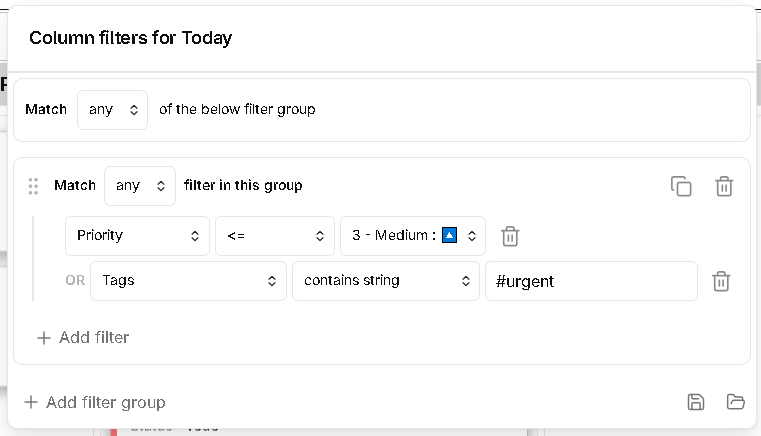
To understand how the criteria, groups and the overall filter menu works, see the example explained in the Advanced Board Filter wiki.