Daily Notes Plugin Integration
Daily notes is a core plugin of Obsidian. Its main functionality is to help you create daily notes easily with the proper formatting for your note names. In the setting of daily notes plugin, you configure the format of the name you would like your daily note to have.
For example, if you have set the format as ‘yyyy-MM-dd’, then your daily note will be created with the name 2026-04-10.md. And also you can set the place where your daily notes should be created and the template you want to have for these notes.
Task Board provides a special functionality known as “Automatically assign inherit the notes name as the date value for the universal date you have set”.
Lets understand this with an example, lets say you have set the universal date as scheduled date. And you have your today daily note with the name “2026-04-10.md” with the following content :
- [ ] Bye grocery and dont forget cereals.
- [ ] This task is scheduled for today, even though it doesnt have scheduled date on it.
Now, as you can see above, these both tasks dont have a scheduled date on them. So, technically, as per Task Board’s rules, these tasks will not going to be shown under today dated column. But, if we enable this feature for daily notes plugin compatibility, we will see something like below in our kanban view :
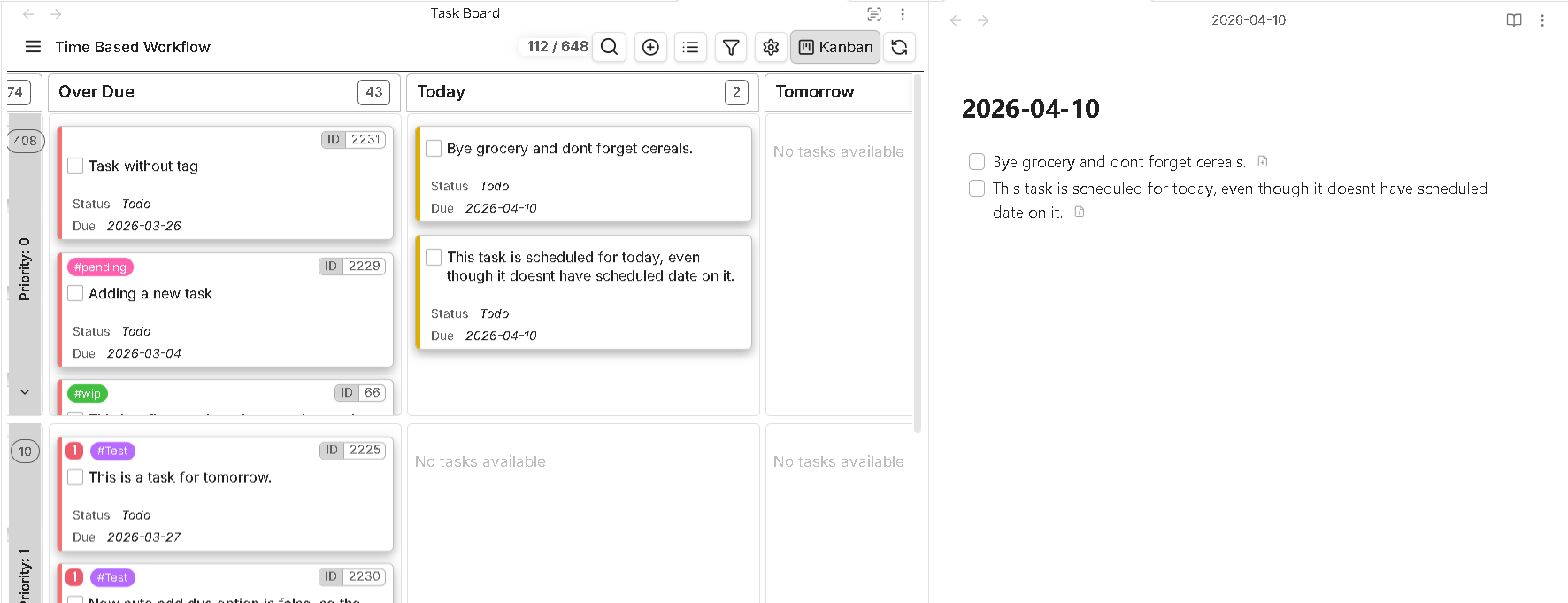
So, as you can see, the scheduled date has been virtually applied to those inline tasks. In other words, the note’s name has been inherited as a scheduled date value for those inline-tasks.