How to troubleshoot an issue
This wiki will explain you how you can use various steps to troubleshoot the issue you are facing in this plugin faster and report it to the developer for prompt solution.
| After you encounter any issue/bug in this plugin, the [[20_Bug_Reporter | Bug Reporter]] should be able to capture the issue and present a report for your further analysis. If the solution is already mentioned in the report kindly implement it. Otherwise please report the issue to the developer by following the steps mentioned in the same Bug Report Modal. |
But, if say for some scenarios the Bug Reporter couldn’t able to capture the issue. In this case you can try any of the below methods to do more analysis on this issue. The second method is more preferred.
Find the bug
Close and open the Obsidian application and try to see if you are able to reproduce the issue again. If the issue happened again :
- Export logs and see if there are any logs mentioned in the exported log file which might be related to this issue. Keep this log file with you, so you can submit it to the developer.
- If there are no logs generated in the log file, you might find something in the Developer Tool Window.
Reproduce in Test Vault
This is the best method to debug any issue and it will help the developer a lot of find the root cause of the issue and will expedite the resolution.
What you are basically doing here is creating a new dummy test vault :
- In Obsidian open the command pallete :
CTRL+ p /CMD+ p. - Now find the run the following command :
Open another vault. - Now you should see the following screen, then click on the Create button :
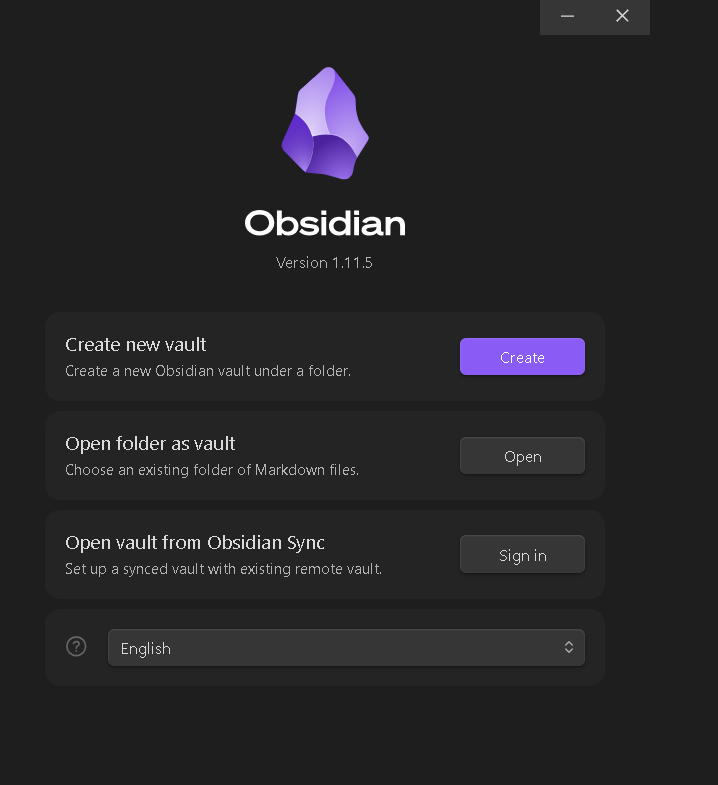
- Now enter any name for your vault and specify where you want to create the vault. This vault will basically going to be a simple folder on your computer. Keep a note where your vault folder exists on your computer.
- Now, try to reproduce the same issue you are facing in your earlier vault.
- Install the Task Board plugin -> Create few dummy files -> Create few dummy tasks -> And configure the settings same as your earlier vault.
- Once you are able to reproduce the issue in this test vault, find the vault folder in your computer. The folder will be of same name as your vault name. Zip this folder and send this folder to either on the GitHub issue ticket you have created or email it to sanketgauns8@gmail.com
If you are able to reproduce the issue in this test vault, that means, its a bug inside Task Board.
But, if you are not able to reproduce the issue, try which other plugins you have in your earlier vault. Try to install all those plugins one by one in this test vault and keep the configuration of them same. Because the issue is might be due to the other plugin interacting with Task Board. Your contribution will help to provide better integration with that plugin which is causing the issue.