Advanced Board Filter
v1.8.0
As this plugin always encourage to have a single board for your every project, it is important that this plugin should provide the required features to filter the specific tasks related to that project. A board can be also used as a customized filtered view as per the user’s requirement. To allow user to a filter to each and every property possible, this Advanced Filter was introduced.
To understand the complete UI of this component, please read the following wiki : Advanced Filter Menu.
This filter menu has various options to add filter to each and every property/metadata possible. It works with three boolean logic operators : OR, AND, NOT.
The menu also allows to add the filters in groups, this will help the user to simplify even complex logic.
How does it work
All your tasks scanned from your vault are stored at a single place called Task Board’s Cache file. When user opens a specific board, the filter applied to the board only pass the tasks which satisfies each and every criteria of the filter.
Lets take an example, say you have applied a filter shown in the following image :
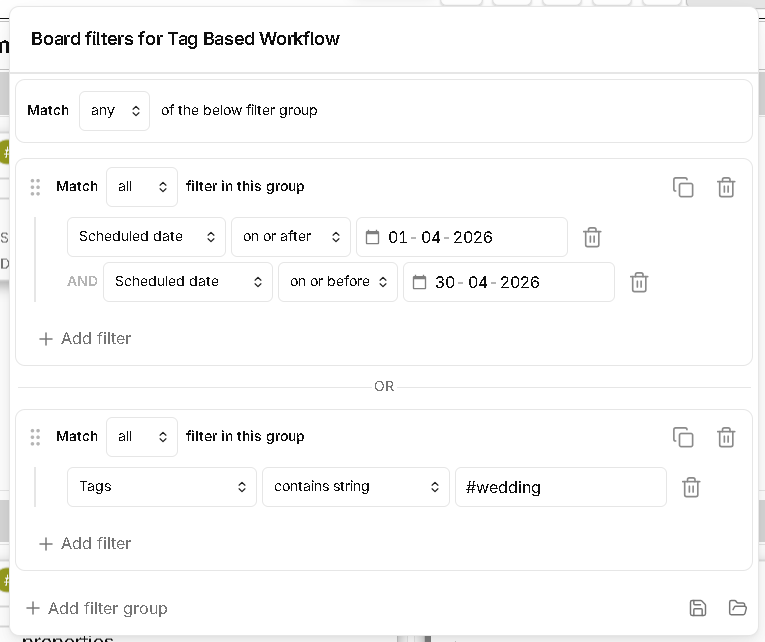
In this filter you can see, there are two groups :
- First Group : All the tasks which have a scheduled date between 01-04-2026 to 30-04-2026. That is all the tasks scheduled for the month of April 2026. This is because, both the criteria in this group are configured in “AND” logic, hence both has to be true, hence this kind of creates a rage of dates, which is the month of April 2026.
- Second Group : All the tasks which has a tag called
#wedding. There is only one criteria in this group.
Now, both these groups are configured in a “OR” condition. Which means, if the task satisfies either of the two groups, the task will pass through the filter and will be shown on the board.
But, if say, both these groups were configured in a “AND” condition, then only this filter would have passed only the tasks which are scheduled for the month of April 2026 and out of these tasks which has the tag #wedding.