Completed
This type of column will show you all the tasks, which has been marked as completed. Please note that, the status of the task can be anything which you have configured inside the Custom statuses settings, but the type of the status should be of type “Completed”.
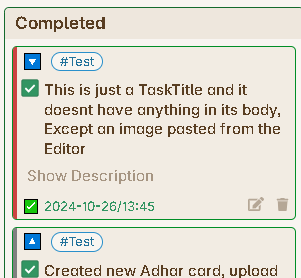
So, you will notice that, all the task item card under this column will have a different fields inside their Footer. Since you have marked the task as complete, you will see the time-date value when you marked this task as complete as can be seen from the below image.
Properties
Column Name
The first property will be as usual the name of the column which you want to see on the column header.
Max Items
This is a number value you want to enter to set a limit to the number of task item cards you want to see under this column. This has been kept to limit the number of tasks rendered under this column, because over a time, you might complete lot of tasks, and if you haven’t deleted these tasks from you vault, then they will be getting appended under this column and will increase the load time of the board, hence setting a limit will help you to show only the latest completed tasks.